
Turn your Mac into the projection booth
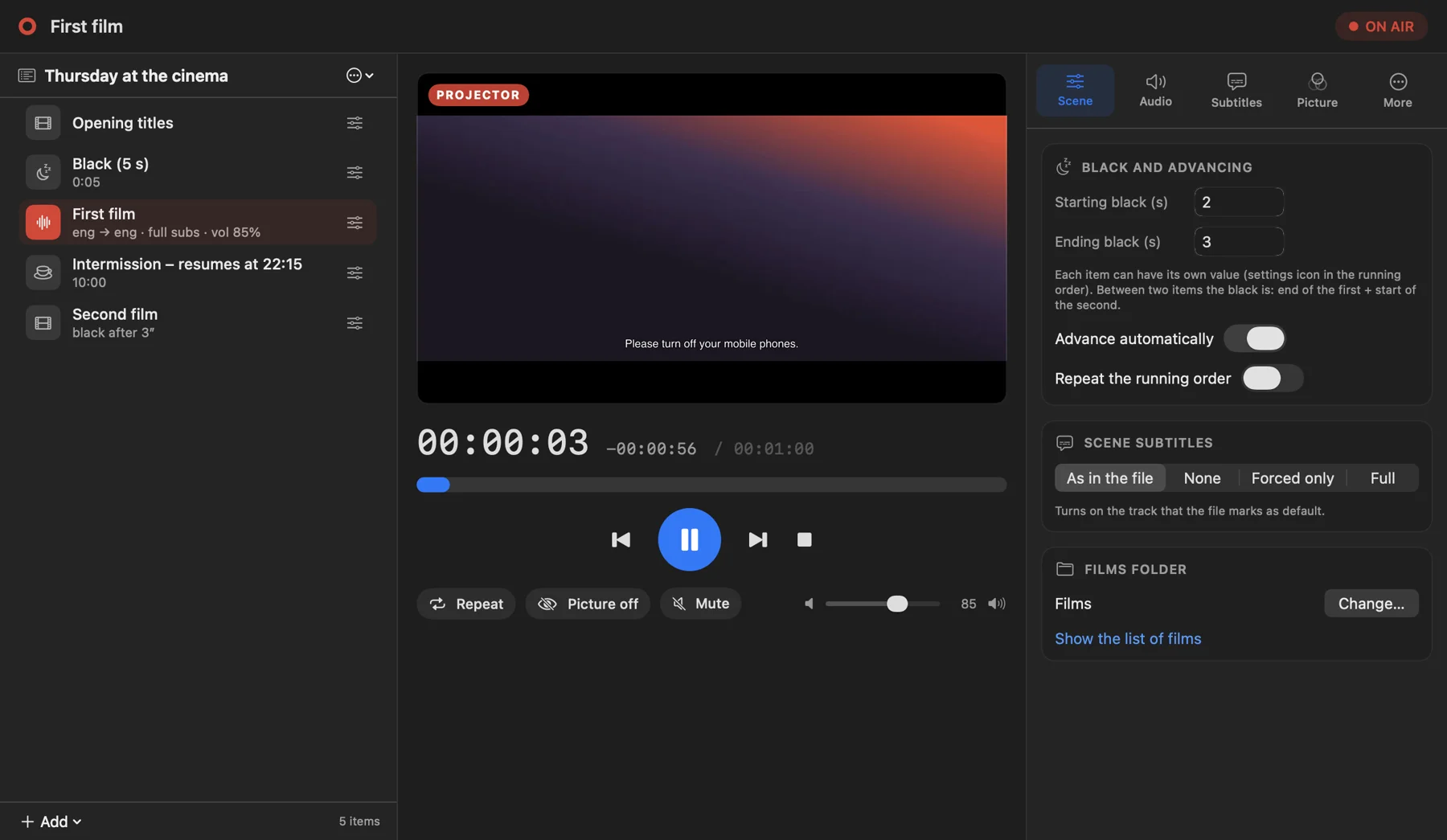
Dolly Projector sends the film to the cinema screen: no bars, no menus, no pointer. All the control stays on another screen, with the scene, the black between films, intermissions, subtitles and a preview of what the audience sees.
Dolly Projector is a Mac app: open this page on a computer to download it.
Three steps, then you screen
Connect the projector
As a second display on the Mac, over HDMI or USB-C. Pick the cinema screen from the menu: the film goes there, full screen.
Build the scene
Add films, blacks and intermissions, reorder by dragging, and set the language and subtitles of each film.
Press play
Dolly Projector handles the transitions by itself. You watch the room, with the projector preview always in front of you.
What it does
A scene, everything in order
Line up films, blacks and intermissions and reorder by dragging. Every item has its own settings.
- Black before and after each film, or a black of its own
- Intermissions with text and a countdown on the projector
- A film can loop forever or N times, then the scene carries on
- Audio language, subtitles and volume for each film
- A scene is saved, reopened, or imported from a .m3u file
What the audience sees, right in front of you
A window in the controls shows the room, even during blacks and intermissions.
- Smooth, at about 20 frames per second (needs macOS’s screen recording permission)
- Without the permission it stays at one image per second
- Elapsed and remaining time always in view
- Pause, jumps, volume and black picture one click away
Please switch off your mobile phones.
Subtitles your way
Choose what starts and how it looks on screen.
- As in the file, none, forced only or full: for the whole scene or film by film
- Font, colour, size, outline and position
- One click back to the initial style
The film is about to begin.
It doesn’t stop
Built for a full room, when there’s no time to start over.
- If the player stalls, it restarts at the same point
- Broken files are skipped
- If the app quits, the film picks up by itself
- The Mac doesn’t go to sleep during the screening
And also
Frequently asked questions
Do I need to install mpv or anything else?
No. Dolly Projector contains everything it needs. Download it, open it, use it.
Can I control it from my phone?
Yes. In the More tab you turn on the remote: the phone scans a QR code, you enter the PIN and control play, pause, volume and the scene. Mac and phone must be on the same network (internet not required, for example with a small router or the phone’s hotspot).
Does it work offline?
Yes. It works only on your Mac and needs no connection, neither to play nor to open the controls.
Which video formats are supported?
mp4, avi and mkv, with the audio tracks and subtitles they contain.
How do I connect the projector?
As a second display on the Mac, over HDMI or USB-C. Pick the screen from the “Cinema screen” menu: the film goes full screen there and the controls stay on the other.
Which Macs does it run on?
A Mac running macOS 15 (Sequoia) or later. Apple Silicon Macs also need Rosetta 2, which macOS offers to install the first time.
Why does the preview ask for a permission?
To show you the projector window smoothly, macOS requires the “Screen Recording” permission. Everything stays on your Mac. Without it the preview still works, but in steps.
What happens to my data?
Nothing leaves your Mac. Dolly Projector collects no data and sends nothing over the network.
Download Dolly Projector
For Macs running macOS 15 or later. The player is included: there is nothing else to install.
Dolly Projector is a Mac app: open this page on a computer to download it.
How to open it the first time
Drag it to Applications
Open the downloaded zip and drag Dolly Projector into the Applications folder.
Open it with a double-click
macOS will say it can’t verify the app (it isn’t signed with an Apple developer account yet). Press Done: don’t move it to the Bin.
Press “Open Anyway”
Open System Settings → Privacy & Security, scroll to “Security”, press Open Anyway and confirm with your password or Touch ID. You only do this once.
Allow the preview
For the smooth projector preview: Privacy & Security → Screen Recording → turn on Dolly Projector, then reopen the app.
OptionalPrefer Terminal? One command: xattr -dr com.apple.quarantine "/Applications/Dolly Projector.app"
Dolly Projector is free
If it is useful to you, you can support its development by buying me a coffee.